|
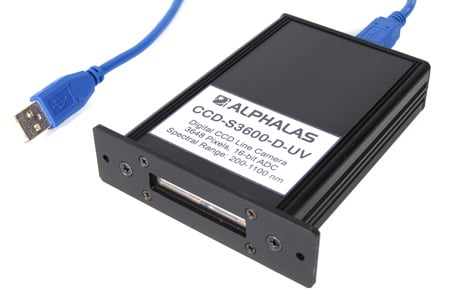

 DATASHEET for ALPHALAS Advanced Digital CCD Line Camera: CCD-S3600-D(-UV) [PDF] DATASHEET for ALPHALAS Advanced Digital CCD Line Camera: CCD-S3600-D(-UV) [PDF]
MANUAL for ALPHALAS Advanced Digital CCD Line Camera: CCD-S3600-D(-UV) [PDF]
Pulsed Laser Application Example for ALPHALAS CCD-S3600-D(-UV) [PDF]
Overview of the CCD-S3600-D(-UV):
The CCD-S3600-D(-UV) is a complete and ready to use advanced high-speed digital CCD line scan camera. The device includes many unique features. At the same time it is easy to use, very compact, lightweight and does not require an external power supply.
The high-sensitivity linear CCD sensor array contains 3648 active pixels and covers a wide spectral range. The sensor is controlled by complex fully FPGA-driven hardware. Other high-end components like 16-bit ADC, 32 MB DDR2 RAM & Hi-Speed USB assure high precision, large data storage & high speed. Highlights include high frame rates with no missing frames, precise control over parameters (e.g. integration time), trigger in & out, multiple operating modes and a unique data streaming mode.
The CCD-S3600-D(-UV) is suitable for novice users who need to simply acquire light intensity data as well as advanced users and experts who want to "squeeze out" each of the advanced capabilities of the device.
The CCD camera supports all major OS and can be interfaced from many programming languages, allowing unlimited post-processing possibilities. Acquisition & Viewer software, always up-to-date USB drivers, interfacing libraries and well-commented applications for LabVIEW and C++ are included free of charge.
Python interfacing and GUI code has been developed by Koen Schouten, Institute of Physics, Leiden University, Netherlands and kindly open-sourced under GPLv3.
The CCD line camera represents an ideal cost-effective solution for numerous applications in science, research, education and OEM.
Features & Highlights:
- Well-proven, best-in-class product with open future-proof concept
- Ideal cost-effective solution for science, research, education and OEM applications
- Used in multiple leading manufacturer's devices as OEM product
- High-sensitivity linear CCD sensor array with 3648 active pixels (8 x 200 µm each), high optical resolution & wide dynamic range
- Wide spectral ranges:
320 - 1100 nm : standard model
200 - 1100 nm : with -UV option (ultra-violet enhanced sensor cover glass)
170 - 1100 nm : with -UV-E option (special enhanced ultra-violet sensor coating and no cover glass)
- High frame rates up to 269.5 fps with no missing frames
- Trigger input & output for synchronization from & to external devices
- Integration time can be set from 10 µs - 1 min in precise 1 µs steps
- Multiple operating modes & multiple trigger modes
- Onboard data storage mode & unique direct data streaming mode: Capture an unlimited number of subsequent frames with no missing frames at the highest frame rate (the only constraint is your storage device)
- Large high-speed 32 MB DDR2 RAM for onboard data storage of 4599 frames & data buffering
- Precise high-speed 16-bit ADC (65536 intensity levels per pixel)
- Plug & play, full software control
- Hi-speed USB 2.0 (480 Mbit/s)
- Advanced completely FPGA-driven hardware & high-speed electronics enable unique features that you will not find on any other device
- Hardware dark correction
- USB-powered, no external power supply required
- Very compact design
- Easy to use with fully software-programmable parameters
- ACQUISITION & VIEWER SOFTWARE for Windows is included for FREE!
- Supports latest Windows 10 and Windows 11 with fully automated driver installation of Microsoft WHQL certified drivers. Drivers for older Windows versions like 8.x / 7 / Vista / XP are also available.
- National Instruments LabVIEW support: LabVIEW drivers, well-commented GUI applications and examples are included free of charge. Compatible with all LabVIEW versions since v8.6.
- Python GUI: Developed by Koen Schouten, Institute of Physics, Leiden University, Netherlands and kindly open-sourced under GPLv3: [DOWNLOAD]
- C++ support: Easily usable code examples for Windows and Linux demonstrating interfacing are included free of charge
- Interfacing the device from other programming languages & development platforms for unlimited post-processing possibilities is also possible through the open future-proof concept featuring free, up-to-date & ready-to-use FTDI USB drivers & libraries
- Multi-OS support: Windows, Linux, Mac OS X, etc. (32 & 64 bit)
- Future OS support is added immediately: As soon as FTDI releases new drivers they can be immediately downloaded from FTDI free of charge and can be used for the device. Unlike other companies, ALPHALAS does not customize FTDI's VID and PID and therefore the device can directly use the original constantly updated drivers as soon as they are released. This is also ideal for OEM applications.
Applications:
- Ideal for science, research, education as well as OEM applications
- Ideal for mobile / notebook / laptop as well as desktop use
- Physics, chemistry, biology, biomedicine, medicine (but not for use on human beings)
- Lasers, optics, photonics, spectroscopy
- Laser beam analysis and spectral measurements
- Measurements: light, fluorescence, M², beam profile, single-shot autocorrelators
- Imaging (1-D or 2-D by parallel moving is possible), data acquisition, machine vision, monitoring, process control, industrial OEM applications
Future-Proof Concept: Compatible with latest Windows and latest LabVIEW versions. Interfacing from other operating systems and programming languages is also possible.
Please download the complete datasheet & operating manual PDF for detailed description, specifications and mechanical drawing:
DATASHEET for ALPHALAS Advanced Digital CCD Line Camera: CCD-S3600-D(-UV) [PDF]
MANUAL for ALPHALAS Advanced Digital CCD Line Camera: CCD-S3600-D(-UV) [PDF]
INCLUDED ACQUISITION & VIEWER SOFTWARE
Our Acquisition & Viewer Software for Windows is included for FREE! No LabVIEW license required to run the software.
Acquisition Mode:
- Easily control the CCD camera and all settings: operating modes (incl. all trigger modes), integration times, frames per acquisition, HW dark correction, trig out in advance
- Easily acquire CCD data: continuous acquisition mode & single acquisition mode
- Easily save CCD data: average of all frames + all individual frames, all acquisition parameters and device settings are also saved in the versatile text file format for easy access from any other software (e.g. Microsoft Excel, text editors, mathematical software, etc.)
Viewer Mode:
- Easily load & view saved data
- View average & individual frames from any acquisition; saved acquisition parameters are also displayed
Tools Included in the Software:
- Zoom & panning, cursors (free & snapping)
- Direct export of acquired data as image files, to clipboard or to Microsoft Excel
Very Easy Installation:
It is extremely easy to install and use our device in any version of Windows:
1. Plug the CCD device into the USB port
Windows will automatically recognize and install the correct certified USB driver. There is no need for manual USB driver installations.
2. Install the desired software
Standalone Acquisition & Viewer Software
No LabVIEW license required.
For LabVIEW developers
The device includes free LabVIEW drivers & applications compatible with ALL versions of LabVIEW since v8.6. If you are a LabVIEW developer simply copy the contents of the included LabVIEW drivers & applications folder (from your product CD) into your LabVIEW's instr.lib folder. Launch LabVIEW, open the included LabVIEW project and enjoy all ready to use applications or modify them as required to suit your needs.
APPLICATION EXAMPLE
Pulsed Laser Application Example for ALPHALAS CCD-S3600-D(-UV) [PDF]
Application Example: Record of the Time Evolution of a Fabry-Perot Interference Pattern of a Single-Frequency Pulsed Laser (visualized in a LabVIEW 3D-Plot). Please find the full application example in the PDF documents listed above.

Included Software for LabVIEW and C++ Developers
Multiple fully-functional LabVIEW GUI application VIs with well-commented block diagrams, front panels and context help are included free of charge.

Modern project-style, plug & play LabVIEW drivers are included free of charge. They are very easy to use and automatically recognize the connected CCD device and use the correct device properties during operation. The drivers have been developed according to the National Instruments driver guidelines.

Python GUI: Developed by Koen Schouten, Institute of Physics, Leiden University, Netherlands and kindly open-sourced under GPLv3: [DOWNLOAD]

C++ examples with well-commented source code are included free of charge. A Microsoft Visual C++ project for Windows (also compatible with VC++ Express) as well as GCC C++ files for Linux, Mac OS X, etc. are demonstrating cross-platform access to the CCD line camera through a simple console application.
Device interfacing from other programming languages is also possible.

The user may modify and adapt all included applications and examples to suit his needs.
The CCD Line Camera: Collecting Light & Data Flow:
Unlimited Possibilities
FREE wireless monitoring of CCD data on your iPad:

We have created a CCD-S3600-D(-UV) data dashboard compatible with the National Instruments Data Dashboard 2.0 for LabVIEW iPad app. The dashboard can be used to additionally monitor raw or processed CCD data (as acquired and processed in LabVIEW) on a remote iPad tablet (requires iOS 5 or higher). We have included the dashboard for FREE with our CCD-S3600-D and CCD-S3600-D-UV line scan cameras. The dashboard app can be downloaded for FREE directly from Apple's App Store.
The user may modify and adapt all included LabVIEW applications and examples as well as the included dashboard to suit his needs.
LabVIEW is a trademark of National Instruments Corporation. iPad is a trademark of Apple Inc. Please note: Apple's iPad and National Instruments LabVIEW are not included with our CCD cameras.
|


 Products